What Your Web Designer Isn't Telling You
Let’s be clear—this isn’t a dig at web designers. It’s just information you should know before you drop money on a business website.
Not long ago, we ran speed tests on 100 UK trade websites—think locksmiths, plumbers, painters. Turns out, 94% flunked Google’s mobile speed standards. We dug a bit deeper into what platforms those sites ran on, and what we found kind of changed the way we think about “web design” in 2026.
The Difference Between What You Buy and What You Get
Web designers love saying they’re making you a “bespoke website.” That word has you picturing someone behind a screen, writing custom code, designing everything from scratch for your business.
Sometimes, that really happens. More often these days, it doesn’t.
Instead, your designer logs into a platform like Duda, GoHighLevel, Wix, or WordPress. They grab a template, pop in your logo and photos, swap out some colours and text, and—presto—it’s ready. This can take a few hours, tops.
There’s nothing wrong with using these platforms—they exist for a reason. But charging thousands for swapping out a theme and calling it custom design? That’s a problem. And the fact that clients never find out what they’re actually getting? That’s another.
What These Platforms Actually Cost
Here’s where it gets interesting. The platforms most “web designers” use are pretty cheap.
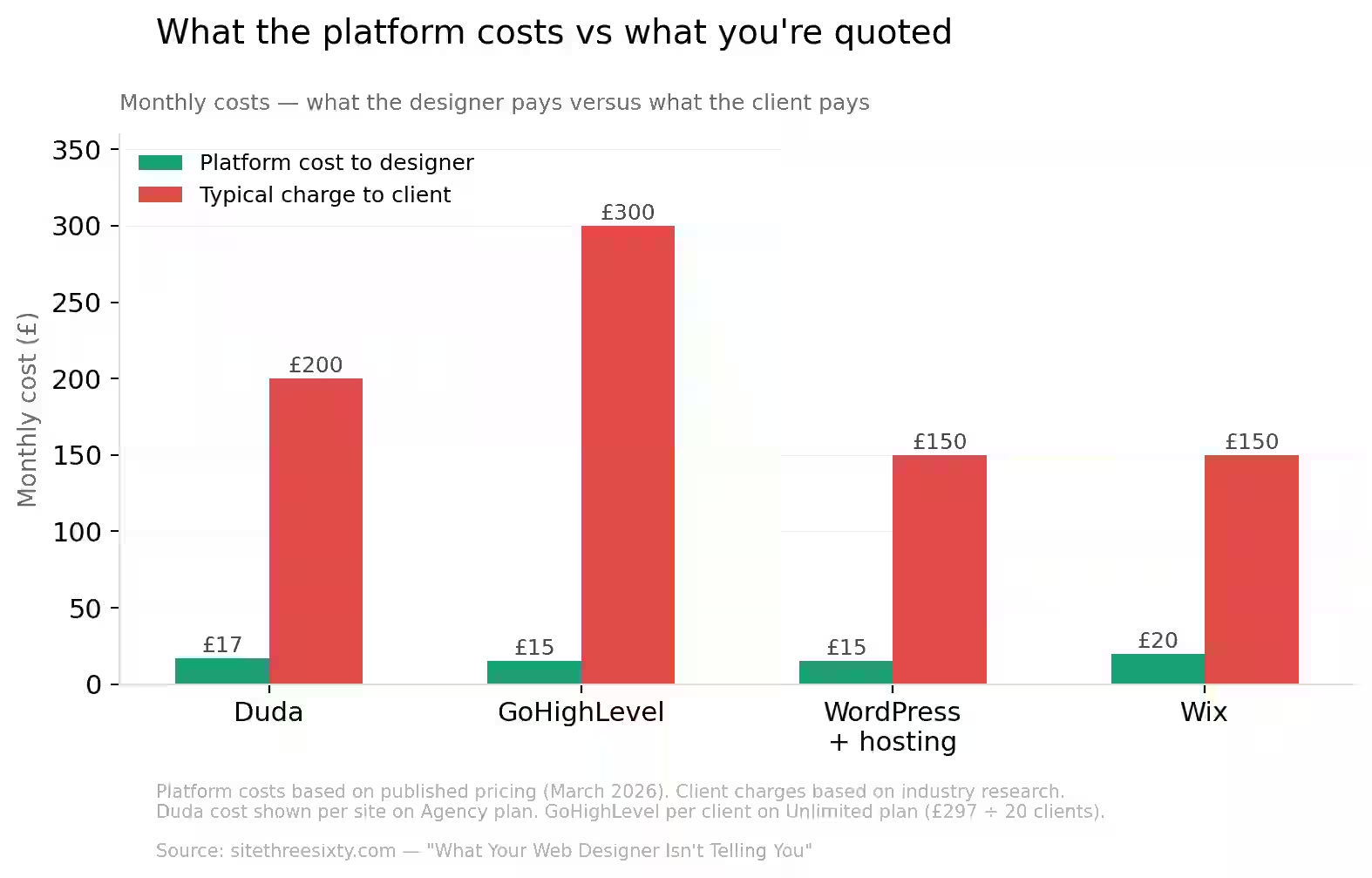
Duda is made for agencies. You probably haven’t heard of it—on purpose. Agencies white-label everything and slap their own brand on it. An agency plan is about $52 a month for four sites, plus around $17 for each extra site. So if they’re running 10 sites, they’re paying about $154 monthly.
GoHighLevel is marketed to agencies too. Their Unlimited plan is $297 a month. That covers as many clients as you want—so 20 sites, still $297 total.
WordPress? Free. A nice theme from ThemeForest costs £30–60, one time. Hosting is £5–20 a month. And a page builder plugin like Elementor is either free, or £50 a year if you need the pro version. All in, you’re way under £100 for a basic WordPress setup.
Wix Business plan is about £20 a month. With a reseller deal, an agency might pay even less.
Now stack those costs against what you’re quoted. If you’re looking at £2,000–5,000 for a “bespoke” website, but really you’re getting a Duda template or a WordPress theme with your badge on it, the maths just doesn’t add up.
How to Find Out What You're Really Getting
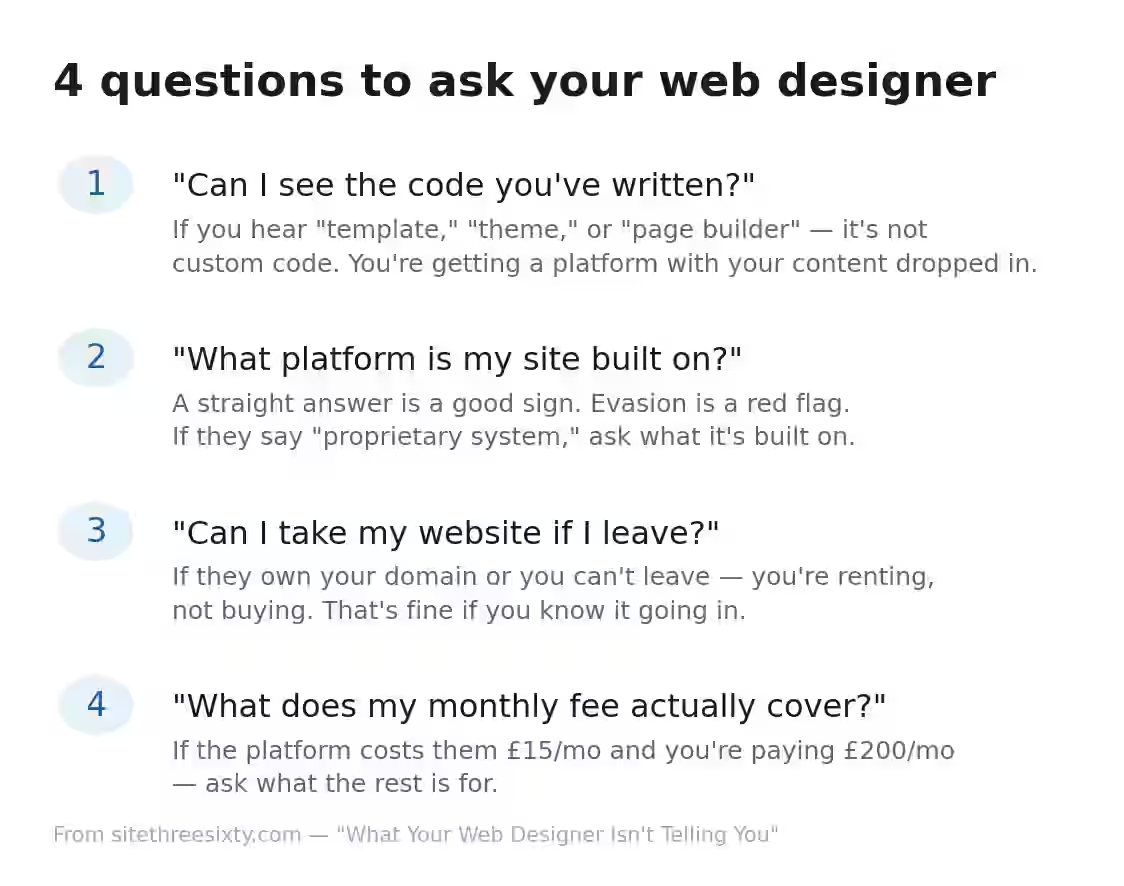
You don’t have to be a tech wizard—just ask the right questions.
“Can I see the code you’ve written?” If the answer is all “template,” “theme,” “page builder,” or vague brush-offs, you’re not getting custom code. You’re getting a platform with your stuff dropped in.
“What platform is my site built on?” If they answer straight, that’s good news. If they hedge or dodge, that’s a warning. If you hear “proprietary system,” ask what it’s built on. Bet it’s Duda, GoHighLevel, or WordPress masked as custom.
“Can I take my website if I leave?” If the answer is no, or they own your domain, or your site only works on their setup—you’re basically renting. That’s fine if you know it, not fine if you’re being told it’s yours.
“What does my monthly fee cover?” If it’s £150–300 for “management” but the platform only costs them £15–25, what’s the rest for? If it’s real ongoing work—content updates, SEO, security, performance tweaks—it might be worth it. But if they just say “hosting and maintenance” and the platform does that automatically, you’re paying for nothing extra.
How the Reseller Model Works
This isn’t a secret. Duda pretty much markets itself to agencies. GoHighLevel’s whole strategy is agencies reselling their platform with their brand. WordPress theme shops exist so people don’t need to write their own code.
It goes like this: the “designer” pays for the platform, builds your site on it using templates, marks up the price for the build, then charges you monthly for access to something the platform handles on its own.
It’s not a scam—it’s a business model. But it leans heavily on you not knowing what’s underneath. The second you realise your £3,000 “bespoke” site is really a £30 theme on cheap hosting, the value collapses.
Odds are, the person who built your site never touched a line of code. They just moved icons around in an editor and picked colours from a menu. That’s not web design—that’s assembly.
Why This Actually Matters
Your website has one job: make the phone ring. Doesn’t matter if it’s Duda or hand-coded. What matters is—does it load fast on a phone? Does it turn up on Google? Does it get visitors to call?
Thing is, most platform-built sites aren’t great at that. Our speed study showed that the average UK trade site takes 10.5 seconds for main content on mobile. Google says it should be under 2.5. Sometimes the platform isn’t the problem—it’s the way the site is built on it. But if you use a template with almost zero custom changes, performance tanks.
When your “web designer” doesn’t really understand code, site speed, SEO, or data structure—because they’ve never needed to, since the platform does it all—your site might rank well today, and vanish tomorrow if Google changes its search rules. And there won’t be anyone who can fix it, technically.
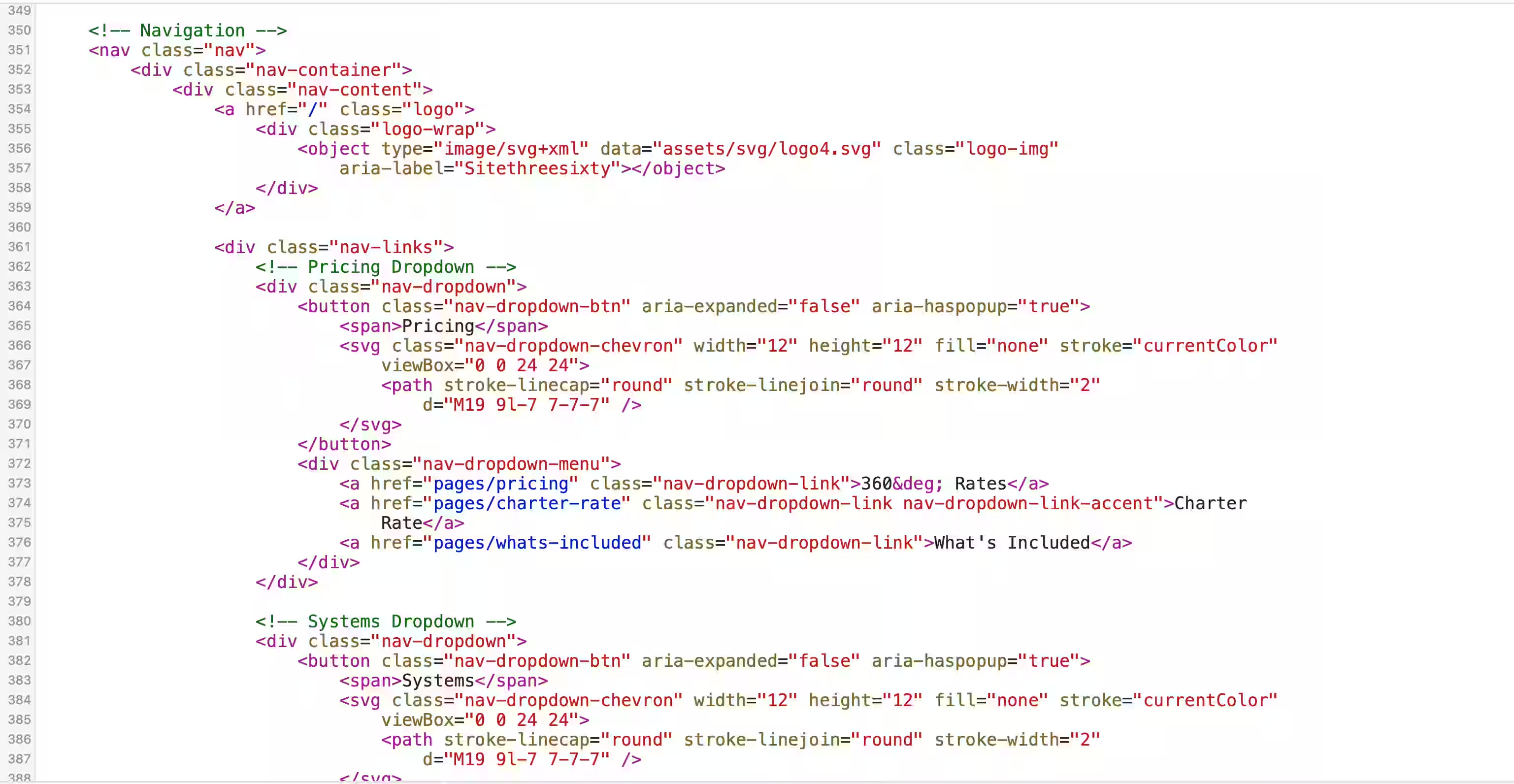
Here’s a real example. Below is the actual source code from a platform-built website — the instructions your browser reads to build the page. You don’t need to understand any of it. Just look at the difference in volume.
A platform-built website’s source code: thousands of lines of machine-generated markup, inline styles, and tracking scripts. Your browser has to wade through all of it before your customer sees anything.
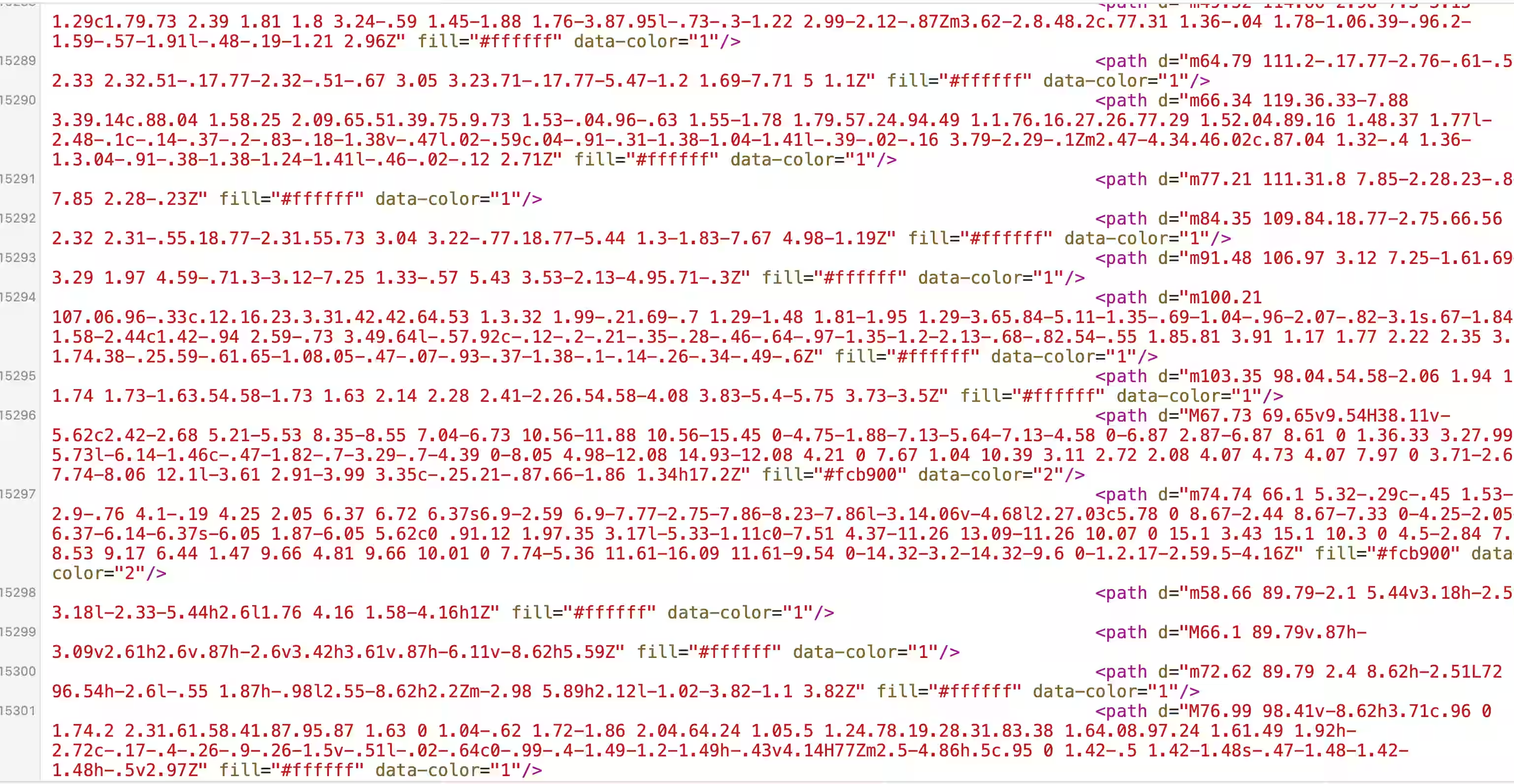
A hand-coded website’s source code: clean, readable, and only what’s needed. Every line has a purpose. Less code means faster loading, fewer things to break, and a site that actually does what it’s told.
What Good Looks Like
Not every designer using a platform is ripping you off. Some agencies use Duda or WordPress skillfully—with real custom work, smart optimisation, and fair pricing. The platform is just the tool; it’s what the person does with it that counts.
You just need to understand what you’re paying for. Here’s what to check for:
Transparency. The right web designer tells you what platform you’re on, what your monthly fee covers, and what happens if you leave. No secrets.
Real performance. Ask for a PageSpeed score. Try Google’s PageSpeed Insights yourself—it’s free, takes seconds, and spits out a score. If you’re getting under 50 on mobile, something’s wrong, no matter the platform.
Ownership clarity. You should own your domain. Know where your site’s hosted. When you leave, your domain and your content stay yours—even if you can’t take the site itself.
Honest pricing. Managed service is valuable—someone handling your website so you can focus on your actual job. Price just needs to reflect the work, not the markup on a subscription.
How We Do It, Upfront
Let’s just lay it out—since we’re asking everyone else to be honest.
We write the code. Every bit. No platform underneath, no drag-and-drop, no templates changed around. We write HTML, CSS, JavaScript, and deploy it on Cloudflare—the same setup giant companies use.
Cloudflare’s not a website builder. It’s just fast, secure space to host your site. It’s like renting space in the best facility around, not slapping something together out on the sidewalk. Platform sites are the sidewalk. Cloudflare is the industrial park. What gets built there depends on the skills of the builder—in our case, actual code written for your business.
“But don’t you need a dynamic site?”—we hear that a lot from business owners who think WordPress or similar is a must. Here’s the truth:
A static site doesn’t mean it’s boring, frozen, or basic. It means pages are built ahead of time for instant delivery, not assembled every time someone visits. You can have animations, forms, galleries, booking tools, Google Maps, reviews, video—everything. Static just means speed.
Dynamic, database-driven sites make sense for big news sites or places like Amazon, whose content changes every minute. If you’re a plumber, your services page will look the same next month as today.
There isn’t a single trade business that truly needs a dynamic, database site. Not one. Selling you on needing one is a great excuse to charge monthly for “database management” you didn’t need in the first place.
If someone tells you static sites can’t handle forms, animations, or aren’t real websites? They either don’t get the tech, or they’re protecting their paycheck. It’s just not true.
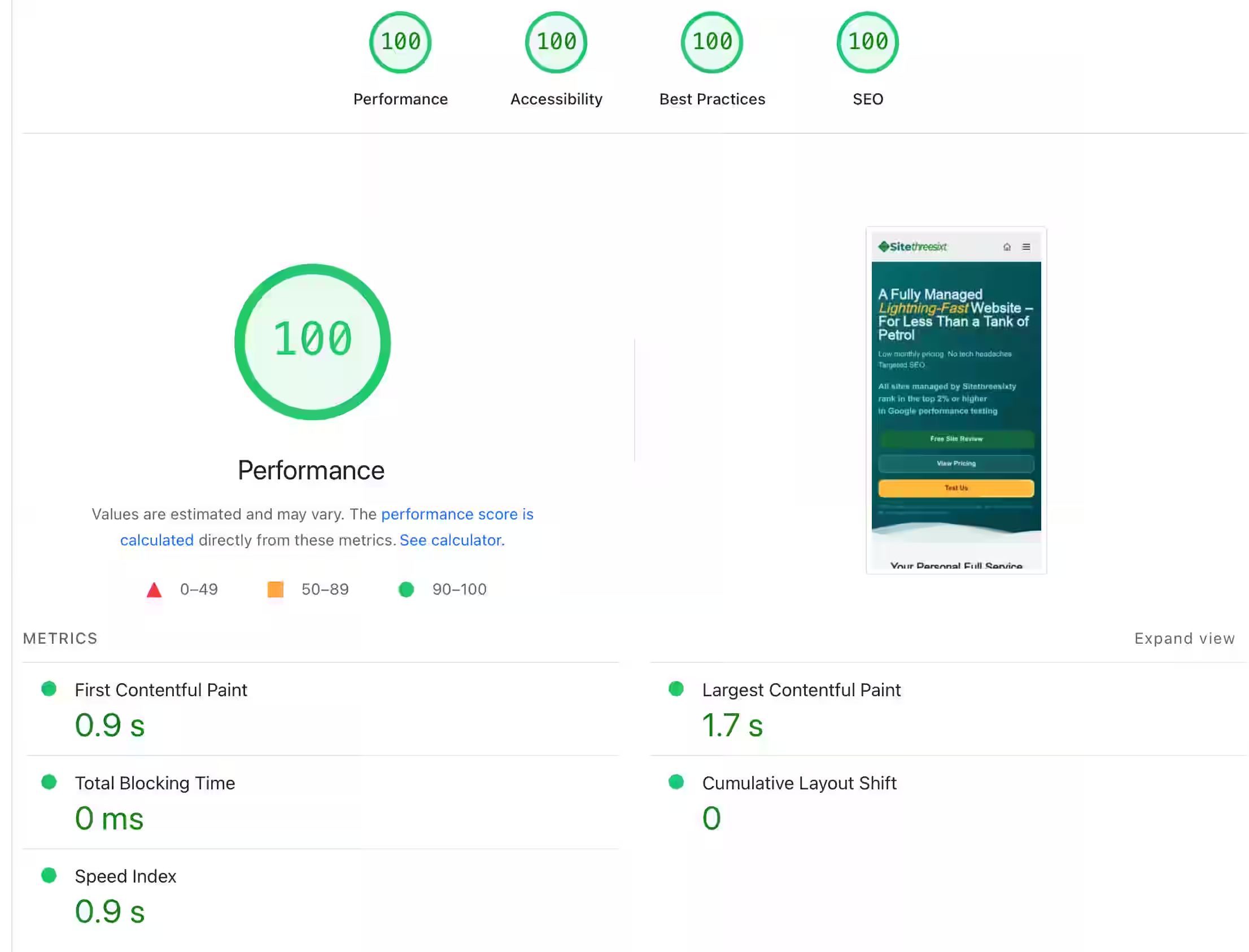
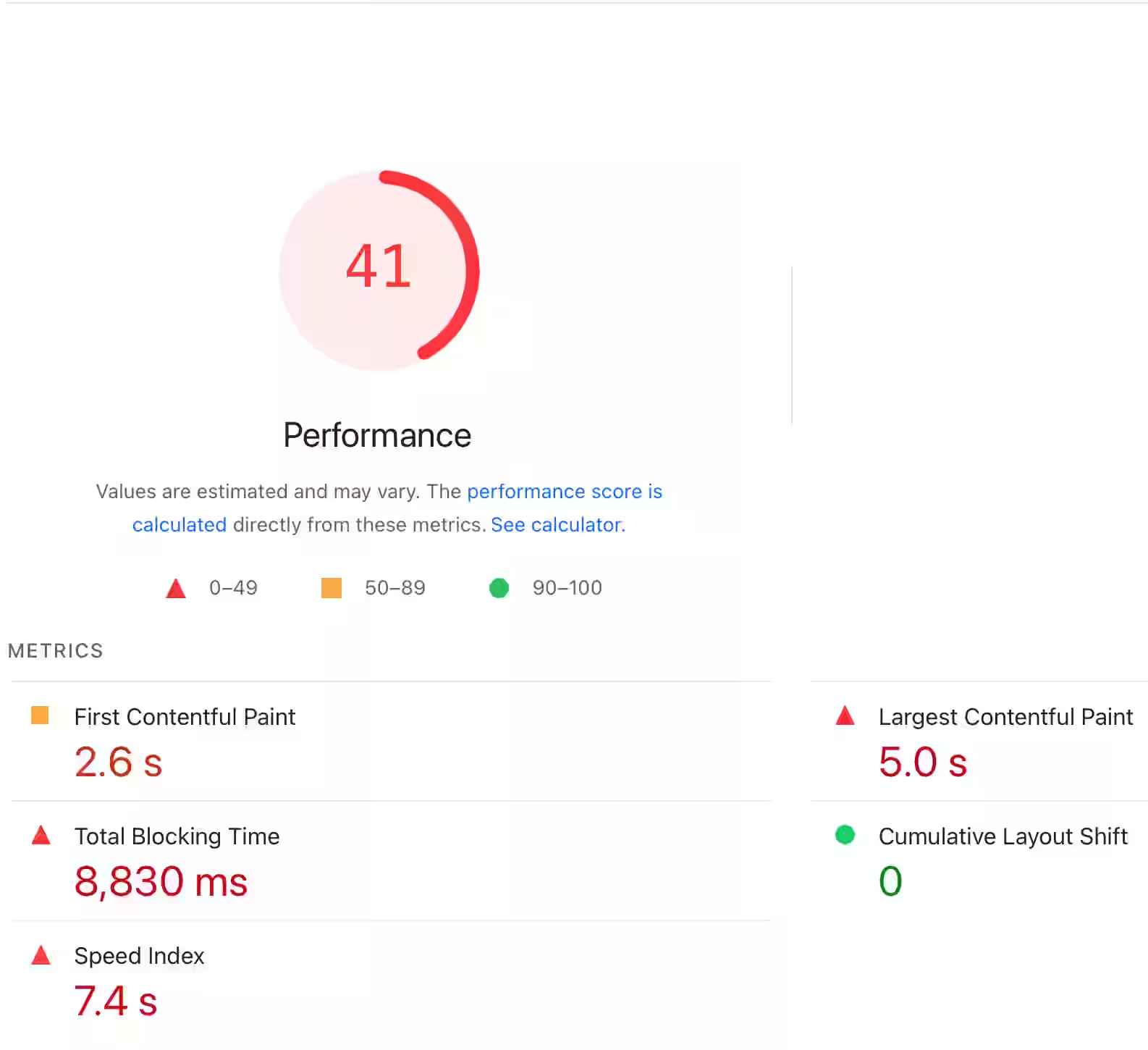
Google scores every website from 0 to 100 on speed, accessibility, and best practices. Green means good. Orange means it needs work. Red means it’s failing. Here’s what the difference looks like between a hand-coded site and a platform-built one — both tested on the same tool, same conditions.
Our site — sitethreesixty.com:
A platform-built trade website:
Why We're Writing This
We’re Sitethreesixty. We build and manage websites for trades and small businesses. So yes, we’ve got skin in the game.
Still, we think an informed customer makes better decisions. If you know what to ask, you’ll either get a better deal from your current provider, or find someone who truly delivers value. Either way, you’re ahead.
Trades run on trust. You wouldn’t cut corners when fitting a boiler or rewiring a house. Your website shouldn’t be built with cut corners either—and you shouldn’t pay top dollar for template work unless you know that’s what it is.
Ask questions. Check the scores. Know what you’re getting.
For reference, here are our own scores—sitethreesixty.com, tested on Google PageSpeed Insights on a 4G mobile connection:
First Contentful Paint: 0.9s
Largest Contentful Paint: 1.2s
Total Blocking Time: 0ms
Cumulative Layout Shift: 0
Speed Index: 0.9s
The average trade website in our study took 10.5 seconds to load its main content on mobile. Ours takes 1.2. And that’s not a stripped-back, text-only page—sitethreesixty.com has images, animation, an animated logo, and everything you’d expect from a proper business site. The speed comes from how it’s built, not from what’s been taken away.
And if you’re not sure your web designer knows what they’re doing, try this: jump onto Google’s PageSpeed Insights at pagespeed.web.dev and look up their own website. Not yours—their site.
If they can’t optimise their own site, what chance does yours have?