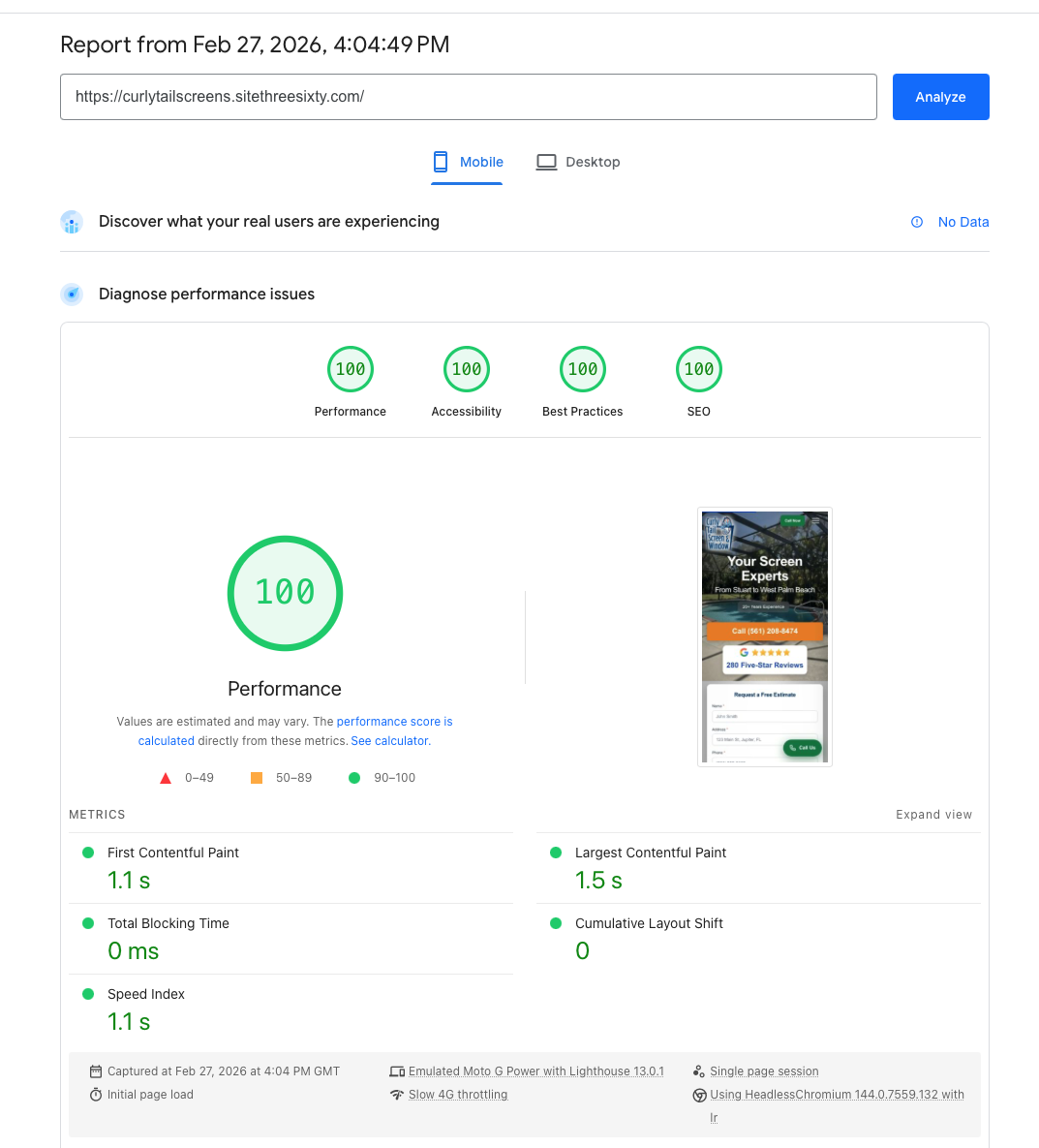
How We Score 100 100 100 100 on Google PageSpeed Insights — And Why It Matters
Is it actually possible to get a perfect score on PageSpeed Insights? Yes. We do it all the time! Here's why that matters and how we make it happen.
If you've ever Googled "PageSpeed Insights" — or maybe you couldn't quite
remember the name and searched something like "Google website speed test" or "Google site
performance checker" — you've probably seen those four coloured circles. Performance. Accessibility.
Best Practices. SEO. Four scores, each out of 100.
And if you're like most people, you looked at your results and thought, "Well, 74 isn't that bad,
right?"
It is. And here's why.
What Is Google PageSpeed Insights?
Google PageSpeed Insights is Google's own tool for measuring how well your
website performs. It analyses your site across four categories and gives each one a score from 0 to
100. Those four categories are Performance, Accessibility, Best Practices, and SEO.
A perfect score — 100 in all four categories — is what every website should be aiming for. Not
because it's a vanity metric, but because Google built this tool and published these scores for a
reason.
They're telling you what they care about. That's not a suggestion. That's a
roadmap.

Our Real Targets Are Even Tighter Than 100
Here's something most agencies won't tell you: we don't actually target the
number 100. We target the metrics behind the score. For Performance, our actual benchmarks are more
demanding than the score alone would suggest.
Our internal targets look like this: First Contentful Paint (FCP) under 1.5 seconds, Speed Index
(SI) under 1.5 seconds, Largest Contentful Paint (LCP) under 2 seconds, and a Cumulative Layout
Shift (CLS) of zero. Not "close to zero." Zero. The page loads and nothing jumps around. Ever.
For Accessibility, Best Practices, and SEO, the target is the score itself — 100 across the board.
No exceptions, no "good enough."
When you hit those underlying metrics hard, the 100 score follows naturally. We're not chasing a
number. We're chasing actual, measurable performance that happens to produce a perfect PageSpeed
Insights score as a byproduct.
"Those Scores Don't Really Matter" — The Worst Advice on the Internet
You'll hear this constantly. SEO consultants, developers, agency owners — people
who should know better — casually tossing out lines like "PageSpeed scores don't directly determine
your ranking" or "don't obsess over getting a perfect 100."
And technically, they're not wrong. A perfect PageSpeed Insights score doesn't guarantee you the
number one position on Google. There are hundreds of ranking factors.
But here's the thing. Google built this tool. Google publishes these scores. Google has explicitly
stated that page experience is a ranking signal. So when someone tells you not to worry about it,
ask yourself: why would Google spend the resources to build, maintain, and promote a scoring system
if it didn't matter?
Think about it like this. Your website is in a race. Not a casual jog around the park — a
competitive race against every other site targeting the same keywords, the same customers, the same
market. And someone's telling you not to worry about one of the measurable performance metrics in
that race.
Would you tell a marathon runner not to worry about their diet? Sure, eating clean doesn't guarantee
you'll win. But while you're loading up on Twinkies the night before the race, your competition is
fuelling properly. Who do you think has the edge on race day?

Or better yet — next time you watch Formula 1, pay attention to how obsessive
those teams are about weight. They shave grams off components. Grams. Not because removing 50 grams
from a brake caliper single-handedly wins the championship. But because when you want to be number
one, you attack every angle. Every marginal gain adds up. You don't leave performance on the table
just because someone told you one metric "doesn't really matter."
Your PageSpeed Insights score is one of those angles. And unlike a lot of SEO factors that are murky
and debatable, this one is measurable, achievable, and entirely within your control. Why would you
not maximise it?

So How Do You Actually Get a Perfect 100 Score on PageSpeed Insights?
Here's the part that might surprise you: it's not that hard. It does not
require you to have a stripped down site, animations, images, video - all completely
possible. It doesn't require magic, some secret plugin, or an army of developers. It requires
discipline and an understanding of what you're building.
Write Your Own Code
This is the big one. Templates and page builders are the number one killer of PageSpeed scores.
Every template comes loaded with code for features you'll never use — sliders you don't need,
animation libraries that fire on pages with no animations, JavaScript for e-commerce functionality
on a brochure site.
When you write your own code, you know exactly what every line does. There's no bloat, no mystery
scripts, no "I wonder what that does." Your code is the DNA of your website. Know it inside and out.
Optimise Your Images
This is the lowest-hanging fruit and yet most sites get it wrong. Serve images in modern formats
like WebP or AVIF. Size them appropriately — don't serve a 4000-pixel-wide hero image to a mobile
phone. Use responsive images so the browser loads the right size for the device. Lazy-load anything
below the fold.
Choose a Cloud Platform With Built-In Caching
Your hosting matters enormously. A proper cloud platform with edge caching and a global CDN means
your content is served from a location close to your visitor, and it's served from cache rather than
being rebuilt on every request. The difference this makes to load times is dramatic.
Trim Out Unused Code
If you didn't write it and you don't need it, it shouldn't be there. Audit your CSS and JavaScript.
If a library is loaded but only 10% of it is actually used, that other 90% is dead weight your
visitors are downloading for nothing.
You Don't Need to Minify. You Don't Need to Inline Styles.
This might sound counterintuitive, but hear me out. If your code is clean to begin with — if you've
written only what's needed and structured it properly — minification gives you marginal gains at
best. We're not saying don't do it if your build process handles it automatically. But it's not the
difference between a 70 and a 100. Clean, lean code is.
Same with inlining critical CSS. If your stylesheet is already small because you wrote only what the
site needs, the browser fetches it fast. You don't need to play games with inlining and deferring
when the total payload is already minimal.
The point is this: know your code. Understand what every file does, what every script loads, what
every stylesheet contains. When you have that level of understanding, a perfect PageSpeed Insights
score isn't a struggle. It's just the natural outcome of building things properly.

The Bottom Line
A perfect score on Google PageSpeed Insights — 100 in Performance, 100 in
Accessibility, 100 in Best Practices, 100 in SEO — is not a myth. It's not a theoretical maximum
that only works on a blank white page. We achieve it on real, production websites for real
businesses.
Is it possible to get a perfect 100 on PageSpeed Insights? Absolutely. We do it all the
time.
The question isn't whether it's possible. The question is whether your current website — or your
current web developer — is even trying. Because in a competitive landscape where every ranking
factor counts, settling for anything less than a perfect score is leaving performance on the table.
If you have paid someone to build you a website or you are paying monthly for a site that is not top
of the search results, that is slow, not productive or it's not scoring in the top 2% - ask yourself
- what am I paying for? If those same agencies or developers tell you it doesn't
matter or try to blind you with figures without proof, you'll know what they really care about
and it won't be your website or your business.
And in a race where everyone's fighting for the top spot, you don't leave anything on the
table.